Supper · Welcome

What Supper is, and how your team will actually use it.

Supper is a business intelligence platform that lets anyone ask data questions in plain language and get verified, auditable answers — no SQL, no waiting on the data team. This page covers how it connects to your data, why the answers hold up, and what comes included from day one.

01 — Integrations

Your data doesn't need to go anywhere new.

Supper connects to the sources your data already lives in. Warehouses and databases are read in place — no copying, no pipelines. SaaS tools sync a clean, governed copy so you can query them alongside everything else without building integrations first.

Warehouses & databases
Snowflake · BigQuery · Postgres · Redshift
SaaS tools
Salesforce · HubSpot · Stripe · Jira · +25 more
→
read-only
Supper
Semantic model Your definitions Join logic Permissions
→
Any question, in plain language
Scheduled reports
Live dashboards

Supper is read-only. It never writes to your data, moves it, or exposes it outside your permissions. Every query is logged and auditable, and your data team stays in control of what Supper can see.

Warehouses & databases In place

Supper connects with read-only credentials and queries your data live at query time. Nothing is copied or cached — your data stays exactly where it is.

SaaS tools Governed sync

Supper authenticates via OAuth or API token and keeps a governed, regularly-synced copy. So you can ask about Salesforce data alongside your warehouse in a single question — without building a pipeline between them.

02 — How to use it

Ask a question. Get a verified answer.

Ask in plain language, get an answer that shows its work — the reasoning, the underlying query, and the sources used.

1Ask in plain language
No SQL, no filters to configure

Type your question in the app, in Slack, or via Claude. "How has ARR evolved for mid-market over the past year?" is a complete question.

2Supper resolves it
Mapped to your semantic model

Your question maps to your metric definitions, field names, and business logic. Supper builds the right query and runs it against live data — about 10 seconds on average.

3Read it — and inspect it
Every answer is a narrative summary, the underlying data, and a link to the exact query that produced it

You can see which sources were used, what definitions were applied, and where the numbers came from. Nothing is a black box — if a number looks off, click "View query" and check exactly what ran.

4Follow up naturally
Context carries across the thread

"Break that down by segment." "What drove the dip in June?" Follow-ups work conversationally — Supper keeps the context.

5Save or schedule it
Pin to a live dashboard, or set a workflow

Any answer can become a dashboard tile that refreshes automatically. For recurring questions, Supper runs the analysis on a schedule and delivers it to Slack, email, or your dashboard before anyone asks.

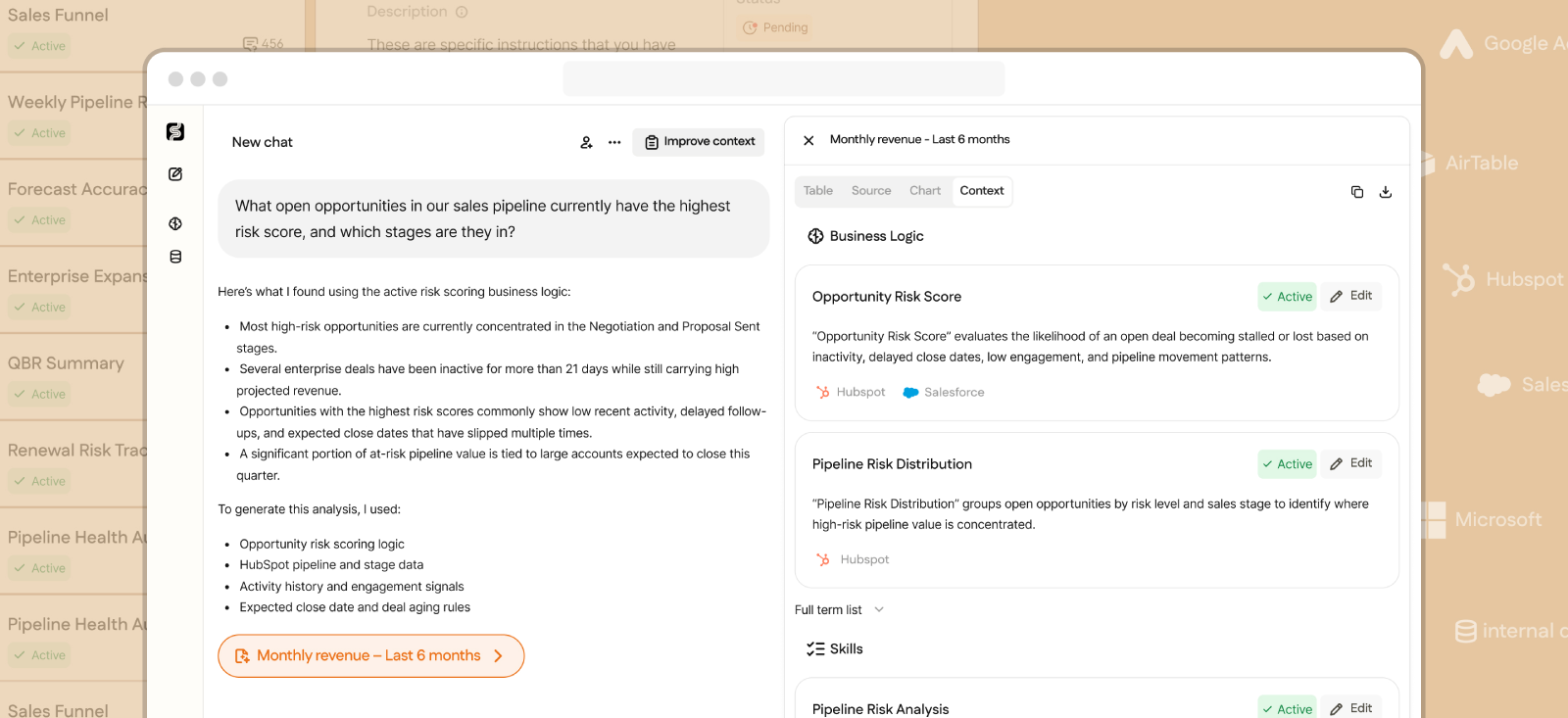
A Supper answer showing the plain-language summary alongside a Context panel listing the business logic and skills it used
A real answer in Supper — the summary on the left, and on the right the exact business logic, sources, and skills it drew on to produce it.

03 — Accuracy & trust

Every answer is verifiable — not just plausible.

Most AI tools give you an answer that looks right. Supper gives you one that is right, and shows you how it got there. The difference isn't the model — it's the governed semantic layer underneath it.

Without a semantic layer
16.7%

Average LLM accuracy on real enterprise schemas with no governed semantic layer. The answers look confident. They're wrong most of the time.

arXiv 2311.07509
Through Supper
>95%

Answer accuracy through Supper's governed semantic layer. The model is the same; what changes is how much it knows before it answers.

 
How Supper produces answers you can trust

If an answer looks wrong, click View query to see what ran, then flag it in the interface. Your FDA reviews it and refines the semantic model — so the same question gets a better answer next time.

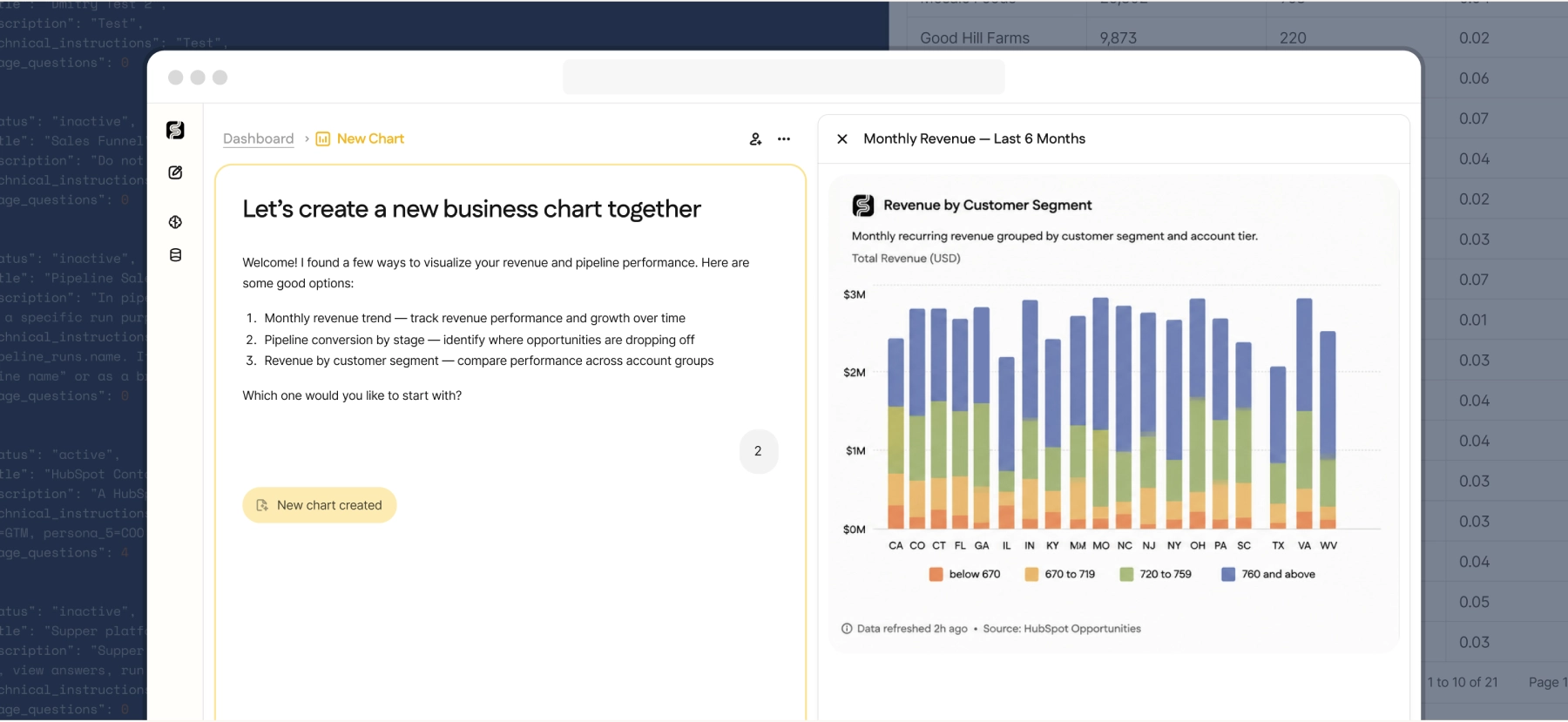
A Supper dashboard chart of monthly revenue by customer segment, with a note showing the data source and last refresh time
Every chart carries its provenance — source and last refresh, shown inline. Revenue by segment, drawn live from the connected source.

04 — The semantic model

The layer that makes answers trustworthy — and smarter over time.

It's the translation layer between raw data and plain-language questions — where your business logic lives: what "revenue" means here, how your CRM joins to your warehouse, which fields belong in which report. The more it knows, the better every answer gets.

AI · on connectGenerated overnight
Schema mapping, field descriptions, inferred join paths, and table grain — built automatically from your source data the night you connect a source.
FDA · days 2–4Your definitions
ARR formula, churn logic, segment rules, business vocabulary — reviewed and approved with your data team in short async sessions.
OngoingGrows with your team
Every question teaches Supper more about how you think about your data. Flagged answers, refinements, and new definitions are incorporated continuously.
Live · auto-updatedSaaS context
Field labels and object definitions from connected SaaS tools update on their own — a renamed field in Salesforce is reflected in Supper with no manual work.
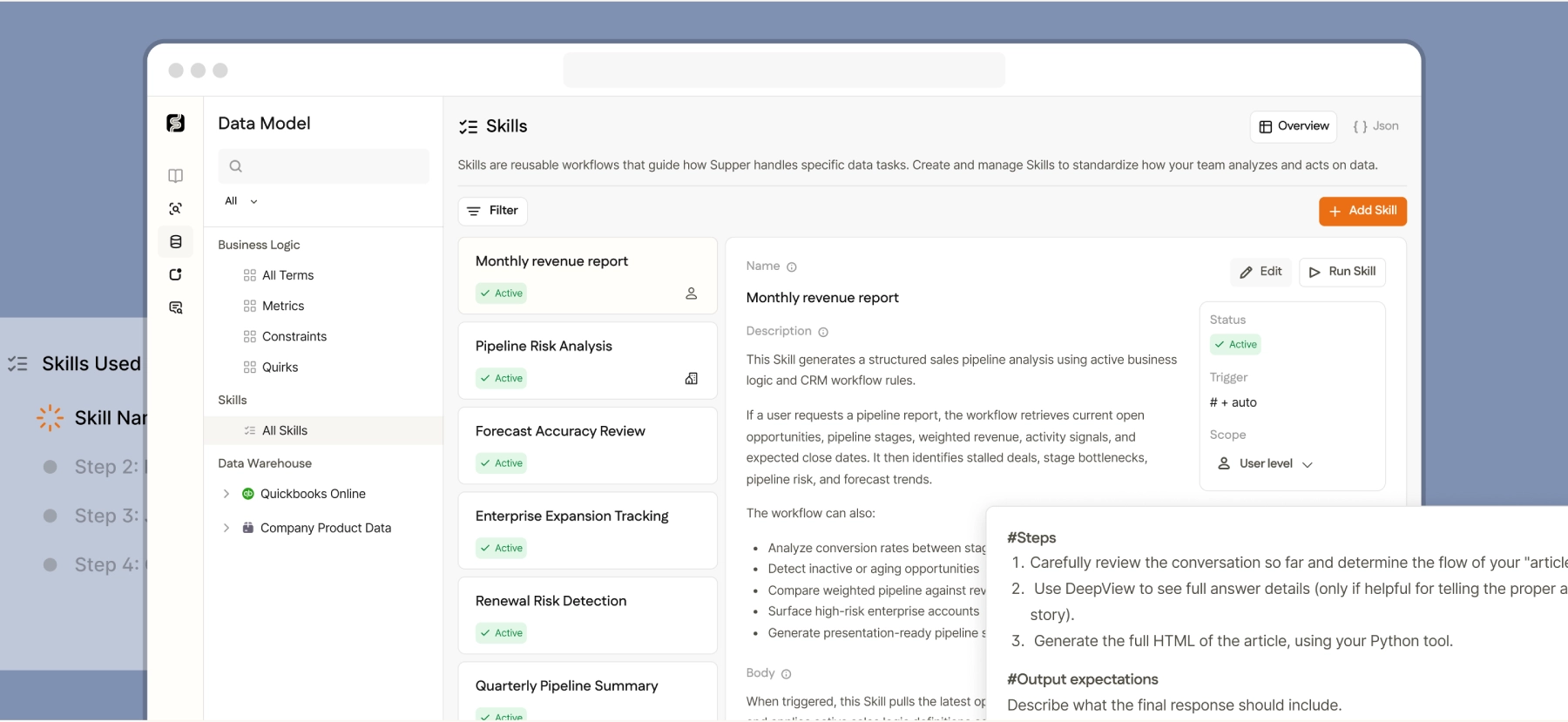
Supper's Data Model view, showing business logic terms, metrics, and reusable Skills in the product
The semantic model in the product — business logic, metrics, and reusable Skills your FDA builds and keeps current.

The more you use Supper, the smarter it gets. Each question asked, each answer flagged, each definition refined makes the model more accurate and more aligned with how your business actually works.

05 — What's included

An analyst is part of the plan — not an add-on.

Every Supper plan includes a Forward Deployed Analyst: an experienced data person who builds your semantic model, keeps it current, and handles the complex analysis your team doesn't have bandwidth for. This is what separates Supper from a software subscription.

Forward Deployed Analyst
A full-time Supper employee, assigned to your account from day one
Onboarding

Builds your semantic model from scratch with your data team — encoding metric definitions, reviewing field mappings, and validating accuracy before go-live.

Ongoing maintenance

Keeps the model current as your data changes — new sources, revised definitions, schema updates. You don't manage this.

Complex analysis

Handles ad hoc research your team can't get to — custom cohort analysis, anomaly investigation, multi-source deep dives.

Answer review

Monitors flagged answers, investigates accuracy issues, and refines the model when something doesn't look right.

Not a consultant, not a contractor. Your FDA is a full-time Supper employee, covered under your DPA and SOC 2. Their knowledge of your business lives in the semantic model, not in their heads. You reach them through a shared Slack channel, not a ticketing system.

06 — FAQs

Common questions

Can anyone on my team use Supper, or just data people?
Anyone. Supper is built for business users — no SQL, no data training required. Sales, finance, and executives all ask the same way: in plain language. Access is permission-scoped, so each person only sees data they're allowed to see.
What happens if Supper gives a wrong answer?
Every answer includes a View query link, so you can inspect exactly what ran. Flagged answers are reviewed by your FDA, who updates the model when something needs refining. A wrong answer usually means the model needs a new definition or caveat. Fixing it improves future answers.
How does Supper handle data I don't want everyone to see?
Every source connects with scoped permissions — Supper only accesses what you explicitly grant. Row-level and field-level permissions from your warehouse are respected, and users only see answers drawn from data they're permitted to access.
Can teams use Supper from Slack or Claude, not just the web app?
Yes. Supper connects to Slack for team-wide querying and automated report delivery. For Claude users, Supper's MCP server lets you ask data questions from any conversation — answers come back through the semantic layer rather than raw database access.
How long does it take to add a new data source?
Connecting takes minutes — authenticate, and Supper begins scanning. The model for that source is built overnight by AI, then refined by your FDA over days 2–4. Most new sources are ready for self-serve questions within a week.
Does Supper replace an existing BI tool?
Not necessarily. Supper handles ad hoc questions, scheduled reports, and agent queries — things traditional BI tools do poorly or not at all. Many teams run it alongside existing dashboards. If you have SQL transform models or BI definitions, Supper can read them as a starting point rather than rebuilding from scratch.
How is pricing structured?
Token-based — you pay for the compute used to answer questions, not the number of people asking. No seat fees. The FDA is included. Reach out for a breakdown tailored to your usage and data footprint.
Who do we contact if something isn't working?
Your FDA is the first stop, reachable through a shared Slack channel set up at onboarding. For platform issues, they escalate to Supper engineering on your behalf. There's no support ticket queue — the FDA owns the relationship end to end.
Welcome aboard

From connected to answering questions in about a week.

Connect your sources, and Supper generates a first-pass model overnight. Your FDA encodes your definitions over the following days, and your team starts asking questions in plain language — with verified, auditable answers from day one. No SQL to learn, no pipeline to build, no ticket queue to wait on.